According to their website, the creators wanted to give back to the community through their podcast. They created a listenable format for people to learn from one another and to share what they have experienced as real life problem solvers.
Available on iTunes, Stitcher, and a bunch of other channels, the podcast does a great job of introducing new concepts and sharing best practices to its subscribers. Some of its most popular segments are “Clean Code” and “Mini Code Adventure,” that give you bite-sizes tidbits on subjects you need extra inspiration on.
If you are not very patient (which is not really an attribute of a developer, lol), Herding Code gives you exactly where things start that you would be interested in. It’s not just a bunch of guys nerding out, but they bring in some pretty big names that know what is going on in the world of programming, especially in the Microsoft world.
The really awesome part is that the links to what they talk about are actually on the notes and you can go right ahead and tinker with it as much as you want!
Another podcast that like to drop big names and big stats. For being another podcast, it boasts its more than three-quarter of a million download over a span of 160 episodes. Topics all over the Microsoft world and most recently the addition of Xamarin to the lineup, the podcast goes in depth with where technology will go in the coming days.
Microsoft Podcasts
THE podcast for Microsoft developers. It even says it on their “About Me.” All the Microsoft technologies- Azure/cloud services, Visual Studio, and Windows (Windows Phone). The perfect .NET newbie podcasts of all podcasts. It’s nerding and geeking out all the time.
They are even nice enough to recognize that all achievements need to be recognized and invites its subscribers to send in topics and even guest on the show!
This podcast has been around forever! With over 1400 shows, this 2016 Software Developer Podcast Award 3rd Placer is THE .NET podcast to listen to, even in 2017. Showrunners Carl and Richard bring in their experience and love of .NET on each show.
They even give out free stuff! Devs love free stuff!
I’ve been doing some kata’s lately and have decided that there is quite a lot in a name. Working on another project that has things named more generically has been a somewhat difficult adjustment to get used to.
The funny thing is that I think that one of the big reasons people opt for descriptive names is because object taxonomy / classification is difficult! In order to properly classify things you have to know exactly how they relate to one another. This implies that you need to know everything there is to know about all of the classes to do it properly. Hopefully there is that someone on the team that is willing to help classify classes as they are created. Otherwise a large project can quickly become chaos!
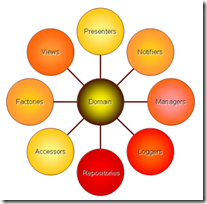
Some time ago I stopped drawing “layers” or “tiers” in my architectural diagrams. The reason is that it’s too easy to get confused and think that DDD has anything in common with N-Tier architecture. There may be some similarities on the surface of things which makes them diagram like each other, but really they couldn't be more different. In DDD the Domain objects (those objects who contribute directly to solving the problem) should be the center of the universe. When it comes to DDD, I really take this concept to heart!
Because objects that those domain objects depend on may not actually be considered domain objects themselves, I opt to omit any/all of these infrastructure objects from my architecture diagram. Why?
- When drawn this way it’s easy to think that the database is the center of your architecture.
- Infrastructure objects, including database access objects, are not very helpful when looking at the high-level architecture because we mostly want to see how these domain objects interact with each other.
- They easily clutter and detract from the purpose of the diagram. After all, the purpose of an architectural diagram is not to show every class or even every kind of class. That is what a class diagram is useful for, and an architectural diagram is a little more abstract.
- By the very nature of DDD, our domain experts need to be able to consume this diagram. That’s tricky when a bunch of objects they don’t understand are also there.
Therefore, when I diagram architecture, I use circles with arrows indicating directionality of the dependency. If I draw an infrastructure object, I will make it rectangle to set it apart from my domain objects.
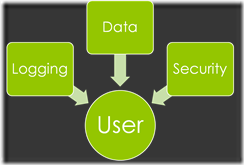
Again, I recommend omitting infrastructure dependencies (aka concerns or cross-cutting concerns) altogether! Another consideration is that sometimes these domains can have hierarchical dependencies. For example, I could have a namespace ‘MyCompany.OrderProcessing.Orders.SalesTax.Providers.SimpleTax’. Because of this hierarchical tendency our domains can literally have smaller domains inside of them. After all, Order Processing is a main domain of the MyCompany company. Orders are going to be at the center of the Order Processing activity. SalesTax deals specifically with orders but is outside the core functionality of an order. Providers are likely required to hook into other systems, and we want to have a specific implementation for SimpleTax. This is the level to which we want to abstract.
It’s going to take skill and perhaps a helpful domain expert to decide where objects outside of this domain live. For example does a customer belong in the ‘MyCompany’ domain or do we assume we have no customers unless we have orders and put them in the ‘MyCompany.OrderProcessing’ domain.
Inevitably someone is going to be setting up the projects and get confused about what projects to make and what to name them. My advice is simply this:
- Create a project in domain spaces where there would/could be code reuse.
- Place interfaces and enumerations in the domain level right above where those interfaces would be implemented (MyCompany.OrderProcessing.Orders.SalesTax.Providers in the example.)
- Build to expand, but don’t put every class in it’s own project. I.E. Order and OrderItems probably belong in the same place (MyCompany.OrderProcessing.Orders). This is because while OrderItems are a closely related and do not make a lot of sense without one another.
- Name data and other infrastructure objects like you would name the domain objects, but remember they are not domain objects!
- Avoid “Common”, “Shared”, “Utility”, or any other project that is a dumping ground for miscellaneous. Classify these classes and put them where they belong, even if they are not domain objects.
- Test projects should test only one domain project. This will allow the tests to follow the project as it evolves.
- Avoid naming the projects with the term “Service” unless they are actually a service like a WCF service.
- Avoid naming projects with the suffix “Interfaces”. This is because the parent domain level should take care of providing the interface. Only in rare cases should the interfaces be included independently. This only creates mostly-empty projects that are unneeded. Additionally it’s more helpful to provide an abstract class for a inheriting class to implement rather than just an interface.
- Avoid separating an objects data from it’s behavior (e.g. You should not split SalesTax into SalesTaxData and SalesTaxManager).
- Use static sparingly! You loose your ability to use dependency injection when you use a static class. In non-static classes, only create a static method when all of the following are true:
- Both the class and the method are stateless.
- None of the inputs to a method are a complex type. You should especially other domain objects. Sealed classes are okay.
- There would never be a need to alter (or for any other reason inherit from) the class.
- The return type from this class is not a complex type or is a sealed type.
Another question that is often asked is how to deal with multiplicities. I.E. what class would deal with finding all orders for a given customer. The answer is that it depends. Many times it would be appropriate to put a “GetOrdersByCustomer” call into Order, but many other times it should go into a peer class (a class in the same namespace) or a parent scope class. In this particular example I would probably create a class named `MyCompany.OrderProcessing.Orders.
For this particular example let’s consider how this domain would be organized and where these pieces would fit-in. Lets say that we have a class called `MyCompany.OrderProcessing.Orders.Order`. This class will deal with order information, both the creation of new orders and as an historical order. You would probably want an `MyCompany.OrderProcessing.Orders.OrderHistoryProvider` or `OrderProvider`, or something of the like. Just remember your SOLID principles!

A couple of weeks ago I listened to a presentation by Scott Hanselman about scaling your life. One of the many great pieces of advice is to blog about something rather than email an answer.
So this afternoon my good friend Alex asked me how we used to convert Vector PDF images to XAML Drawing Brushes so they can be applied to objects as a background, for instance. The vector part of that sentence is important because any rasterized portions of the PDF will be excluded in this process.
Well, there really isn’t a lot to it, so here are the instructions:
- Open up your vector image in Inkscape. Inkscape can open a wide variety of images, including PDF.
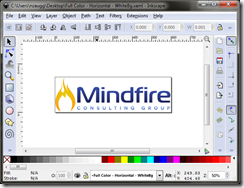
- Click File –> Save As. Drop the Save as Type to “Microsoft XAML (*.xaml)” and save the file as XAML. Once the file is saved you can open it up in Internet Explorer to see how the conversion process went. The problem though, is that this is painting directly to a canvas and is not packaged to be used as a background.

- Open up Microsoft Expression Blend. Create a new project. Open up the XAML for the main file and replace it with the contents from your file from step 2.
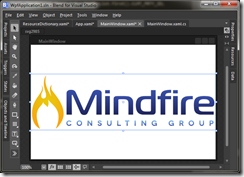
- Select all parts of the drawing then select Tools –> Make Brush Resource –> Make Drawing Brush Resource. This will pop open a dialog that will give you some options about where to define this resource and what it should be named.
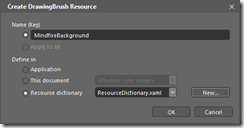
So now your technically done. The contents of the Resource Dictionary now contain your new Drawing Brush Resource. To test it out clear all content from your main window except for the Window and Grid objects. Click the whitespace and open the properties inspector. Click the square dialog button for the Background and select Local Resource and the name you gave your brush. You should now be able to see your image:

The reason it is stretched is because your drawing brush will stretch to fill it’s contents. If you have a look at the XAML of the main window shows you will see the following XAML:
<Grid Background="{DynamicResource MindfireBackground}">
That’s pretty much it!
It’s sometimes nice to be able to uninstall a previous version of your product before installing a completely different new replacement app. You can do this by using the msiexec /u {product id} command but who the heck knows the Product ID? I do if I wrote the installer but that’s not always the case. Luckily there is a neat powershell command to find the product ID’s of everything installed:
Get-WmiObject -Class Win32_Product
You can even add | Out-File myfile.txt to pipe the output to a file.
 I’ve been following a very interesting discussion going on in the local Agile Roundtable group. They have been talking a lot about how agile is really a “conversation with the situation”, a conversation that involves product owners, end users, and developers. At the heart of the discussion is a tendency for people to push out the agile principles of “don’t design that yet” in an attempt to eliminate risk. Funny that all of the experts weighed in stating that they know from experience that the result will only increase risk.
Anyway, someone posted this article that I think is quite interesting. (http://www.agileproductdesign.com/blog/the_shrinking_story.html)
Some statements of note are:
“Did you catch the up front design there? Statements like "knowing more about what to build" implies that someone spent whatever time was necessary to figure out what to build. When stories were large - estimated in weeks, and up to 5 weeks at that, not many details were resolved to give those estimates. Those details were deferred for resolution later – immediately before or during the development iteration. Developers were expected to collaborate with those in a customer role to arrive at what those details were. … [Otherwise], the developers who get these user stories miss out on a lot of context they might have had back when stories were large and conversation was more mandatory.”
“The second approach, deciding what the application looks and behaves like early, I think is the most risky - and involves the most upfront work. In this approach we've had to decide up-front – and hastily at that – what tool our users need to solve their problems - then slice that tool up the way a butcher slices a side of beef. We then build each cut a piece at a time.”
I’ve had this battle quite a bit lately. In one hand you have management who would really like to know when to expect the new product so they can start marketing it. On the other hand you have effort going into up-front design that traps us in the conversations of yesterday overriding the reality of today. It’s often been my experience that much of the design has to be re-thought once the developer begins the process of implementation anyway. Not only were some of the details missing in the original conversation but months down the road the conversation may be a whole lot different leading to confusion about how what the customer wants integrates to the “master plan”.
I sincerely believe that if we really practiced the principles of Agile and have the conversation with the situation – delaying the design of any specific piece; we will get to market faster overall.
 I was asked to fill in for Michael Palermo from Microsoft because he had a personal issue come up that made it so he couldn't attend the Fall 2011 Utah Code Camp. He sent me over his demo files and I added some to the end after coming up short on time after rehearsing it a bit. I mostly added the animation portion that begins after the CSS Media Query demo.
CSS3 is a really cool technology and can add quite a lot to your website. As you can see in the example, the website enhanced with CSS3 is much nicer to look at and has some interactive features that while possible before were much more difficult to implement.
CSS3 Why & How Presentation Video
Download Full Quality Video (WMV) | Mobile Quality Video (WMV)
The demo files and slides can be downloaded here.
As a follow-on to my last presentation “Intro to HTML5” I have created a new presentation “Get Going with HTML5” where I dive deeper into some of the most used features of HTML5, mainly Canvas, Audio, and Video. Below is the recorded presentation I gave at the Fall 2011 Utah Code Camp. The slides and example code can be downloaded here. It’s in two parts because I had to change my screen resolution half way through.
Part 1 - Slides
Part 2 - Example Code
Example code and slides can be downloaded here.
 I quite literally grew up in the start of the PC wave! In 1976 the Apple 1 was released and a few years later I was on the scene. We never had an Apple 1, but we had a Personal Computer (PC) in our house from the beginning. The very first one I remember actually using was our old TRS-80. Boy could this puppy hum at an amazing speed of 1.77MHz with it’s Zilog Z80 processor! At first there were some games you could play, but when the computer got moved from the basement to the upstairs the floppy disks no longer worked. That meant that the only thing I could get to was Level II Basic. I was very sad that I could no longer play games on the PC but I was quit amused by a trick that my brother Brandon showed me:
Which, if you remember your L2 basic is shorthand for: 100 PRINT “Nate is Awesome!”. I thought that was quite a neat little trick and when I learned how to make a loop so it would repeat as many times as I wanted I was entranced! I would print stuff 100, 1000, 10000 times, numbers I couldn't even begin to comprehend! I don’t know exactly how old I was but I’m pretty sure that I was probably younger than 8 years old. I figure that I might have even been as young as 5 years old. It didn’t take long before I had the computer asking for input and displaying output and all kinds of things. The problem was that once you turn the computer off, your program is toast!
Not being able to save any of my hard work was very frustrating for me but it did challenge me to build it back better than it was before. If I had to simply refactor an existing program it would have been harder. For one the basic I was using was line numbered and if you didn’t save yourself enough room, you better be prepared to litter your code with GOSUB. When I re-wrote the program from scratch I could avoid problems I ran into in previous attempts. It by no means meant the frustration went away. I made several attempts (the best I could do as a pre-teen) to fix the floppy disk drives to no avail. The TRS-80 also had the amazing feature of being able to use a tape recorder to record and restore your programs. This I must have tried hundreds of times and never had any success!
At first I was trying to use a standard cassette recorder rather than the special CTR-41 tape recorder with the feature of a remote jack that would let the computer automatically start and stop the cassette. Those tape recorders were about $40 and believing that I could actually save my programs I really, really wanted one! I believe I may have even asked for one for my birthday at some point. To understand how bad it was trying to save and retrieve programs this way, here is some text from WikiPedia:
The cassette tape interface was very slow and erratic; it was sensitive to audio volume changes, and the machine only gave the very crudest indication as to whether the correct volume was set, via a blinking character on screen when data was actually being loaded - to find the correct volume, one would sometimes have to attempt to load a program once adjusting volume until the machine picked up the data, then reset the machine, rewind the tape and attempt the load again. Users quickly learned to save a file three or more times in hopes that one copy would prove to be readable.
Saving my work started to become a big deal to me. One time I spent many months working on a series of programs, games, and of course a Main Menu System to access it all! Unfortunately for me the TRS-80 produced huge amounts of electromagnetic interference! So much so that even with the computer operating in my bedroom in the upper floor of a 2-story home, the TV in the basement would be significantly affected and would show a fuzzy picture. My brother had a date and they wanted to watch a movie but he had to turn the computer off to get a better picture. I was SAD! Several months later I had finally gotten hold of a cassette recorder that had the magical remote port. It wasn’t a CTR-41, but I was sure that the existence this magical remote port that would make all of the difference. Nope! Like I said, do this day I never, ever, got more than a few characters to save and restore from tape.
 A few years later our dad invested in a 386 DX 8/16MHz with 8MiB or RAM, a math co-processor (upgraded later) and a 80MiB HDD! The new computer also featured a very nice EGA (16 color) monitor! This was quite a machine for it’s time and if I remember correctly cost around $3k. The Computer Room was established and the old, very inferior, TRS-80 went into the room along side it’s nicer, newer counterpart. I still used the TRS-80 for a year or two longer. I didn’t always get a turn on the new computer and Tetris appealed to everyone in the family!
When the time finally came to take the TRS-80 down for good for some reason I thought to pop it apart first. I guess I figured that if I did any damage there would be no harm now. It was then that I saw the blown fuse in the expansion interface. I put some tin-foil over the fuse and was bewildered to see that the floppy disk drives once again worked! All of those years and the problem was a blown fuse in the one part of the computer I thought was doing all of the work all along.
I did like the new computer though. For one it could save my programs! :) It also had QBasic that didn’t require line numbers and I liked the color screen. I think I must have decided pretty early on that I wanted to be a programmer. When I was still pretty young (maybe 9 or 10) we took a trip to BYU to see the museum and stopped in the book store. They had tons of books on programming basic! I wanted to get two of them but my parents graciously agreed to buy me one. I believe the book was like $60 so I would be happy with one. I read that thing inside out over and over again.
When my brother Preston got to high school he started learning Turbo Pascal. Now I don’t remember exactly how this came about but one time we both had written a drawing program. Preston used Turbo Pascal and I used QBasic. It was almost like we were in competition with each other to see who could make the best drawing program. They were nothing fancy – neither one of us knew how to enable mouse support so it was keyboard commands and arrow keys only – and we weren’t exactly writing the same features. Preston would have an unlimited undo buffer, I would have the ability to save as bitmaps, etc. so they were apples to oranges but it was a lot of fun. One day he added the ability to display cool text in neat fonts to his drawing program. My battleship was sunk! There doesn’t seem to be any way to do that using QBasic. If you can’t beat them, join them; I switched to Turbo Pascal.
Me and Preston didn’t always get along so congenially. One time after a particular nasty computer crash that wiped out the entire hard drive, my brother decided that he would lock me out of the computer. Never mind I had nothing to do with the issue! I could usually break in anyway, and for the most part though (or at least upon reflection) we got along pretty well sharing the PC. Another quark of mine was to grab the Computer Shopper magazine and imagine myself with all of the awesome hardware! I wanted a new computer so bad that for my 15th birthday I actually got an Osborne II (not realizing how old they were at the time). It looked like the computers in the magazine so I figured it had to be close!
My parents and brothers were very supportive of my self-guided computer exploration. Some examples of note are getting a copy of Turbo Pascal, more programming books, more computer hardware, college courses in programming and electronics (when I was 14), more computer software, a 2400 Bps modem, a $400 phone bill acquired by calling BBS’s in California with said modem (what? all of the BBS’s in the state were busy!), and a copy of OS/2 I got for Christmas. We were also among the first to get the Internet, first with Prodigy and then with AOL. We had our AOL account for a very, very long time! I admit that I did rather like AOL – the Internet never seemed as friendly again.
 All through Jr High and High School I would make computer programs to do my homework for me. I had an instant love for the TI series calculators! My first TI calculator was the TI-80 (in blue) which was faster than my old TRS-80 and had the same style CPU! It was also programmable with a form of Basic and I wrote many programs; none of which I could really share because of the lack of an external port. I sold it to my neighbor and got a TI-86 as an upgrade. I wrote a LOT of programs for the TI-86 and when I checked a few years ago the ones I wrote in High School are still in Roy High School. Blackjack, Scorched Earth, TextEdit all passed down from student to student. These calculators have still not been decommissioned in spite of having a 20+ year run! Although I only owned a TI-86 in high school, I borrowed others calculators to port programs to them. My high school masterpiece was a program called BOS and a text editor, both written in Basic. BOS was a shell/menu system which was useful because running programs on the TI-86 was not very easy otherwise. I later learned how to write assembly for the Z-80 processor and spent a significant amount of time developing a preemptive multitasking operating system with full GUI/graphics. I even used an assembler that was written to run on the TI-86. I got to some level of completion but never really released anything to anyone but a couple of friends. I now own three TI-86, a TI-82 (my wife’s), and a TI-89 (loaned to someone and I don’t know where it is right now).
It will be very interesting to see how my kids react to the technology age. The computers I played with when I was young were very different! In a way I had a great learning curve where about the time I outgrew a PC another one had been invented. Now days my kids have a much better computer but the understanding is probably going to be much more superficial at first. Although, if I had all of the resources of the Internet when I was a kid I could have gotten so many more answers and progressed so much further! They also have the added benefit of my knowledge. My Dad could work computers but never understood them like I do. It will be very interesting if my kids post a blog page 25 years from now and lament that they had to deal with only a 1GHz processor on their tablet (more than 1000x the speed of the TRS-80) or that their battery life was only 9 hours, etc. I’ll pull out this blog post and send it to them.
In my blog series of “Too Funny to Not Post” comes this latest edition. I opened up a certain beta Microsoft product. It then prompted me with this dialog box:

When working with a Beta product I usually opt into such programs (not so with released products). I suppose there was little point in beta testing a product if I do not provide any feedback. After all, if I have problems on my computer I want those problems fixed for a release version! So I clicked on the checkbox to opt in and pressed “OK” and was greeted with this message:

Dammit!
Well, I guess perhaps they should have tested that first! On the pro side the actual program worked just fine after this window blew up.
 I ran into this really neat app this week called App Inventor for Android. It allows for rapid prototyping of Android applications. I have used DroidDraw in the past and have found it to be very helpful in designing Android UI. It won’t do anything when I’m done but I can at least save me some of the guesswork involved in UI layout. App Inventor goes one step further and will allow you to add basic functionality to the application.
App Inventor probably won’t allow you to create anything but the most simple applications but it is a great addition to the Android development experience. While I still consider WP7 development experience to be tops; Android is sure nipping at it’s heals. For IOS, let’s just say that unless you’re using MonoTouch the development experience is *much* less!
I have a buddy who was going to be giving some presentations to high-school kids. Specifically he asked:
- What would you be looking for if they approached you about work?
- Perhaps you are in that age group right now. What do you want to know?
- Perhaps you are just a few years into the workforce. What do you wish someone had told you but never did?
- Perhaps you have children, relatives or friends in or soon to be in that age group. What are you worried they don't know about?
- I'm sure there are other perspectives and questions I'm not even thinking about. I'd like to hear what you have to say about it.
Here was my list:
- Don't be afraid to try! Don't let the perception that something is too difficult stop you from experimenting.
- Curiosity may have killed the cat, but an un-inquisitive person is mostly useless.
- Stolen from Einstein: You don't really understand something until you can explain it to your grandmother.
- It's never enough to be smart, you also have to work well with others.
- Before you can be really smart, you must learn how to learn.
- There will always be someone smarter than you are -- Become their buddy! Get to know great minds and learn all you can. Some knowledge can only be expressed this way.
- Communication, Communication, Communication! Projects rarely fail because of technical reasons and the difference between good programmers and outstanding programmers is how well they communicate.
- A good work ethic never goes unnoticed.
- Know when to ask for help and when to figure something out for yourself.
I am so envious of the kids growing up now days. I had what I considered a very rich environment; we had computers in my house since I was very young, we were always given any books and programs we wanted, and there was never a shortage of encouragement. These days the technology is so much better and anyone with a real interest has unlimited resources in the form of the Internet, and technology is spectacularly accessible! Never in the history of the world has there been this kind of learning environment. If only we knew better ways to teach the kids in school – and perhaps had better things to teach them, but at least anyone with a real thirst for knowledge will have no limits.
Here is a fun little C# Duel:
http://pexforfun.com/Default.aspx (click Random Puzzle)
I solved my first one in just 1 try (compilations) so it doesn’t take long to try.
What is Pex and how does it work?
http://pexforfun.com/Documentation.aspx#HowDoesPexWork
Basically Pex is a tool to help you write Unit Tests by actually calculating all of the permutations of a function and assisting you in creating unit tests that should deterministically “prove” that function. When used in conjunction with another tool called Code Contracts (a little bit down on the page) more information can be expressed about the intent of the function which Pex can then use to help prove by unit tests. The neat thing about Code Contracts is that it’s part documentation, part unit test in its self.
If you want to see it in action, you can try it here:
http://pexforfun.com/default.aspx?language=CSharp&sample=_Template
This is a branch of computer science called Static Analysis & Verification and is the future of computing in our field.

I am a continual student of good user interfaces (UI). When asked what my weakness is as an Interview question I will almost always admit that I am severely UI impaired! If the UI is designed professionally then I can usually implement it pretty well, but if I am left to my own devices to create a UI the resulting creation is U-G-L-Y!!!!! More than that it is often not as practical or as functional as a good UI design would be.
I can however appreciate good UI design. I can see that this works better than that or this is a good intuitive UI. Although I am a champion of the Ribbon Interface that so many of you despise (mostly because it took you years to memorize the crappy menu’s and toolbars you had before it) so that may put my credibility in the area in question with some of you anti-ribbon fan-boys!
Today I ran across a beautiful example of a really good UI design. Here it is:

This picture popped up shortly after I enabled AdBlock. I am a big cheapskate – especially when it comes to software! That may be oxymoronically considering I am a programmer, but usually the way I respond when I see a “nag” screen or the like is that I want to get it out of my face ASAP and I’m sometimes even a little annoyed that it’s there. For me a good example of donationware that I like is Paint.NET; whereas donationware that I feel bugs me a little too often would be Win RAR. Both are of tremendous use for me (Paint.NET more than WinRAR), but my warm fuzzy feelings are just more with Paint.NET because I don’t feel like the pester me. Of course there is the adage out of sight, out of mind and when designing donationware you will have to find new and interesting ways of accomplishing inception. Even with Paint.NET (after I’ve installed it literally dozens of times on dozens of different computers) I usually don’t dwell too much on the idea of donating. I’ve considered it for Paint.NET where I haven’t as much with other donationware, but never made the leap. I read every single word on the page, and seriously considered donation and that’s why this UI is so effective!
This UI is so cleverly done that I wanted to read every little bit of it. The first think I saw was the picture. This makes the programmer a real person and that is big! The second is “This may be the last ad you ever see” is a great headline that makes you curious. The use of the slider-bar with red/green gradient is brilliant! To add a bit of fun the “thank you” message changes when you move the slider.

To Recap, a good UI will have the elements of:
- Hook: You will want to learn more
- Intuitive: You know what it is going to do before it does it and you’re comfortable that it’s not doing something unintended
- Attractive: Gone are the days of flat-style buttons and plain looking UI. Even the most mundane of user interfaces is expected to look like a champ now days.
- Simple & Clean: There should not be too many knobs and levers on one screen
- Fun: Although not required, defiantly helps!
 I am one of those that was quite upset about the announcement from RedGate that .NET Reflector would no longer be free. Particularly since it was given to them for free and they have only mucked things up from the original. It was also my understanding that one of the conditions under which Lutz Roeder gave them the code was that the tool remain free. I guess I can remove myself from the “RedGate” fan list.
I was so upset about the announcement that I not only wrote RedGate to tell them how much I disapproved of the move but I also started a new project to replace reflector. I didn’t have too much time to invest in it and never uploaded anything to CodePlex before they deleted my space. I may not use .NET Reflector every day but I use it enough to miss it. Probably enough to pay for it, but I won’t be supporting RedGate! Of course free is better. I could write a whole blog post about why I would pay for tools and components but how time and time again these tools cause me stress!
Fortunately I wasn’t the only one who had the idea to build a free reflector and someone with a bit more time than myself has a working product that does 90% of what I need a reflector to do for me. ILSpy is a great little tool that looks almost indistinguishable from .NET Reflector.

As you can see it reflects .NET code giving you an excellent decompilation of the source files. There are a few features that I miss from this app. Mainly all of the plug-ins that were available. The plug-in that I miss the most was Reflexil, one that was built using Cecil (from the Mono framework) that would allow you to change the IL of an assembly and save it back. The application is open source so perhaps I’ll make me a version that does that. Perhaps someone on the ILSpy project wants this feature as well? If I do make the plug-in I will certainly make it public!
 I really like my HTC HD7 phone. I bought it the day they came out (although I had to visit two or three different places before I could get it). I sure wish I got the OLED display in the deal but overall I’m pretty happy with the phone – although I haven’t had the time to develop the apps I wanted to for it. My only other qualm might be that it’s not very hacker-friendly and I dig being able to modify my hardware in ways to make it more useful to me.
Microsoft has been very aggressive in marketing their new platform and so far it’s been a mild success. Now that the copy & paste update has come out, there has been less mud for critics to sling. Well, this and perhaps the Nokia deal has made the seers at Gartner take notice. They predict that Android will become #1 with a commanding 48% market share in 2015, but also state that in that year WP7 will eclipse IOS to become the new #2 with nearly 20%. Whether you trust analysis from Gartner is another blog post but there are a lot of things going for Microsoft’s platform.
As an aside I currently own an HTC HD7 sporting WP7, a Xoom tablet featuring Android Honeycomb, and an iPhone 3G with IOS 3.x (jail broken). I go for what I think is best. Actually, I am selling my iPhone on eBay and I’ve never owned an Android phone but I consider myself somewhat technology impartial. I choose WP7 in some part because of the development experience (it’s fantastic) but haven’t done too much with that. I’m also enjoying my Xoom tablet a lot more than I expected – the experience is very smooth and it has made pulling out my 17lbs Alianware Laptop less necessary for a lot of things. While I may not be a fan of Apple or Google I can sure respect a well made product.
I guess only time will tell, but consider that in 2010 roughly 75% of the phone market were not smart phones and there is still a lot of virgin market left to capture. With WP7 available on all major carriers and with a wide verity of hardware partners, they may have duplicated the Android recipe for success.
More Posts
Next page »